Posts

Showing posts with the label communication

Power PD- Recharge With 5 Ideas in 5 Minutes Issue 1
Image
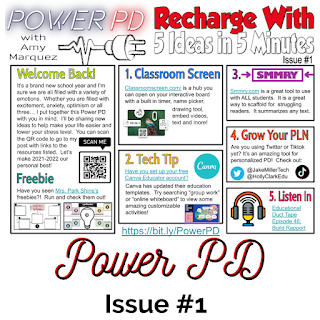
I'm so excited to finally be sharing my 2021-2022 Power PD newsletter.  I was inspired by many other educators who have been doing #PottyPD or #CopierPD and I wanted to try this out but put my own spin on the name.  Each issue with have a short message from me and 5 ideas teachers can use to "recharge" their teaching.  Ready to check it out?  Here we go! Welcome back to the 2021-2022 school year!  Thank you for taking the time to check out my Power PD newsletter and this blog.  The purpose of this blog is to share my educational journey with you!  On here you will find additional information about the items in the Power PD flyer you saw.   I will be posting all Power PD newsletters in one Google Slides deck.  You can see it below.  Please check back often for the latest newsletters. 1.  Classroom Screen - this is an awesome tool you can use to help you manage your classroom.  Check out Pocketful of Primary's video tutoria...

My Go-To Technology Integration Tools

Image
Hi friends!  As the return to school quickly approaches, I am preparing materials to share with my staff.  One of the items on my to do list is to put together a list of tools that would be the tools I'd recommend to any teacher to try out.  During the school year, I made a list of all the technology tools I am familiar with and I categorized them by how I would use them, for example- collaboration, video editing, creative response, screen casting, etc.  It started out as a Google Doc that you can check out here.  Since then it has evolved.  I knew I wanted to take this to the next level and make it more visually appealing.  So I did a thing... I made an ebook using Canva!  I put together some tips on lesson planning with technology integration and some tools I'd recommend based on the 4 C's.  I wanted to make sure it was not too overwhelming.  So you will find a few tools for each category.   Can I ask for your help?  Wil...

2021-2022 Keep, Lose or Try

Image
This post is week 6 of 8 in the #8WeeksofSummer Blog Challenge for educators.   This time I'm looking into what I will keep, lose or try in the upcoming school year.  I really liked this question posed by the Hot Lunch Tray blog: "What makes educational technology a keeper?"  To me this is an essential question to address because as we come back to completely in person instruction my goal is to help teachers feel empowered to continue using technology in impactful ways with students and not just say well we are back let get out the worksheets.  In order for educational technology to be a keeper for me it has to address the 4 C's- creativity, critical thinking, communication, and collaboration and it needs to be simple enough that we aren't wasting too much time explaining how to use the tool over and over again.   Which Tools Will I Keep? Canva - 100% yes!  This year I attended a session by Kristina Holzweiss, author of Hacking School Libraries and @li...

Clarity and Engagement Key to Successful Communication

Image
This post is week 5 of 8 in the #8WeeksofSummer Blog Challenge for educators. This week's topic is all about the successes and challenges of communication during the pandemic.  It became crystal clear that during virtual learning the focus of communication needed to broaden to reach students multiple ways.  Without students coming to the virtual space of the library or classroom, I couldn't rely on signage on walls, tables and doors to spread the news of upcoming events and new resources.  Also I had to consider, how can I get my learners talking in a virtual environment? During this past year, communication had to get an over haul to meet the needs of the different learning styles of my learners and to ensure accessibility to make learning equitable for all.  When instruction was happening in person, many times I would give the directions and model how to do something.  I would include written directions for multi step assignments.  This strategy alone did...