Posts

Showing posts with the label professional developement

Power PD Issue # 3 Productivity

Image
  This issue of Power PD includes some creative ways to increase productivity, build your PLN and jazz up your slides presentations.   You can check out the slidedeck with all the links here. Productivity:   I think each of us is thinking about how we can be more productive and eliminate unnecessary stress in our lives.  I had a chance to listen to the Truth for Teachers Podcast recently as they discussed 5 ways to improve productivity.  I highly recommend you tune in to the episode to hear the host really delve into each of the 5 tips.  I thought I'd take a few minutes here to reflect on how I plan to use those tips in my life: 1. E liminating unintentional breaks and making intentional breaks. For me this is a big one, sometimes I find myself jumping around from task to task and I have found that a daily to do list keeps me grounded.  Since the pandemic I started using an iPad and the GoodNotes app to organize my thinking and planning.  One...

Making Professional Learning Stick

Image
  Throughout my time as an educator there have been training sessions that really stuck with me and those that were quickly forgotten.  As I begin rolling out Tech Tuesday sessions with teachers this school year, I took some time to reflect on what makes an interesting, memorable and impactful training session for me.  These are some of the questions I consider in how I provide training for teachers: 1.  What does this look like in the classroom? 2.  How can I apply what I've learned? 3.  How does this solve a problem or make my life easier? 4.  Is the information easy to follow and come back to? Making Thinking Visible- What does it look like in the classroom? In my recent training session with my teachers, we revisited their Gripe Jam which I spoke more about in this blog post .  They delved into brainstorming areas they are struggling with in their classroom.  It could be organization, lesson planning, lesson implementation, engagement, ut...

Transformational Change Through Google Coach Program

Image
Big announcement!! I just found out I am officially an Google Certified Coach!  Getting started with tech coaching has been a dream of mine for awhile.  In this blog, you will be following along in my journey as a librarian and tech coach.  Come along with me as I navigate how to balance running a high school library and support my campus with impactful technology integration.  It is new waters for me and I'm excited about the challenge ahead. During the pandemic, my perspective on technology integration changed as the reality of one to one devices and virtual learning set in.  I saw the need for more teacher support in navigating the sea of technology tools and options.  In the summer of 2020 I heard about the Google Certified Coaching program .  I had just applied to be a Google Trainer and I knew from completing that certification program I wanted more of what Google had to offer.  The Google Trainer Program prepared me to provide effective an...

Power PD- Recharge With 5 Ideas in 5 Minutes Issue 2

Image
This issue of Power PD includes some creative ways to engage students and to keep your momentum going as we fall back into the routine of school.   It's time for Power PD issue #2!  We are back in the campuses with students here in my area.  I'm looking forward to all the opportunities to collaborate with my staff to make this year amazing.  I recently had a chance to present in our district technology conference and I was able to listen to over one thousand educators as they shared their word for 2021 using an EduProtocols strategy called Thin Slides.  The overwhelming majority of educators in my district are excited, but nervous as we approach a new school year in a pandemic.  I'm right there with them.  I admire their persistence and optimism moving forward, and I look forward to all the potential this year holds for each of us.   Let's Collaborate- Please reach out and let's collaborate on your next project.  I'm so excited to h...

Canva PD Choice Board

Image
Looking to brush up on your Canva skills?  Interested in trying out the new features?  I have just the thing for you!  I put together this Canva PD choice board that you can use to explore the features you are interested in.  You can work the tasks in any order you choose and at you own pace.  The most important thing is to choose what you feel you need to learn about and just have fun!   This post is part of a training session I held for our district back to school technology professional development.  You can find my presentation linked on the choice board.  Don't forget to download your badges and share them with me @SoTxLibrarian and @LibrarianLugo I'd love to hear what you think of this choice board. Please tell me in the comments below.  

Make Your Graphics Look Amazing With Canva Keywords

Image
When you are creating in Canva, there are so many amazing items build right in that you can add to your graphic designs.   Elements in Canva has updated and now you can find photos, shapes, graphics, videos, animations and more all together in one tab.  This is an amazing feature when it comes to searching because everything is in one place  However, sometimes it can almost be overwhelming trying to decide what to include from the elements tab.  That is where Keywords come into the pictures.  I am putting together a series of mini tutorials walking you through how to use these features in your classroom.  Today's topic is how to make your graphics look amazing with Canva keywords. How to Remove Backgrounds in Canva 1.  Go to Canva and login to your account.   2.  Create your presentation or choose a presentation/ project you have already made.  This works for any size project.  It doesn't have to just be a slideshow/ prese...

How to Remove Backgrounds in Canva

Image
Have you ever wanted to remove the background on your photo?  Well, Canva can help you out with that!  I am putting together a series of mini tutorials walking you through how to use these features in your classroom.  Today's topic is how to remove backgrounds on Canva. How to Remove Backgrounds in Canva 1.  Go to Canva and login to your account.   2.  Create your presentation or choose a presentation/ project you have already made.  This works for any size project.  It doesn't have to just be a slideshow/ presentation. 3.  Add a photo to your project.  You can upload your own photo or browse through the stock photos on Canva.  Make sure to choose a photo with a simple background. 4.  With your photo selected go to the top toolbar and select effects. 5.  Choose background remover.  If you don't see it scroll down to the bottom of the list of effects. 6.  Now you can resize your photo if you need to and place...

How to Present and Record in Canva

Image
Did you know that Canva has a screencasting feature embedded right inside?  You can record your screen right inside Canva!  I am putting together a series of mini tutorials walking you through how to use these features in your classroom.  Today's topic is how to present and record on Canva. How to Present and Record in Canva 1.  Go to Canva and login to your account.   2.  Create your presentation or choose a presentation/ project you have already made.  This works for any size project.  It doesn't have to just be a slideshow/ presentation. 3.  Go to the top right hand corner and select the three dots.  Choose present and record . 4.  Choose go to recording studio. 5.  Set up your microphone and camera.  6.  Click start recording. 7.  Once you finish click end recording.   8.  Then click done. 9.  Download video or share the link out.

How Present Live on Canva

Image
Hey, fellow educator!  Did you know that Canva has been adding some amazing updates just for educators like us?!  I am putting together a series of mini tutorials walking you through how to use these features in your classroom.  Today's topic is how to present live on Canva. How to Present Live in Canva 1.  Go to Canva and login to your account.   2.  Create your presentation or choose a presentation/ project you have already made.  This works for any size project.  It doesn't have to just be a slideshow/ presentation. 3.  Go to the top right hand corner and select the three dots.  Choose present. 4.  Choose standard.  Once you are in presentation mode look at the bottom right hand side and turn on live. It looks like of like this ((.)) 5.  With Live turned on you will see "start session."  Turn this on. 6.  Share your link and code with your participants. 7.  Click on any questions or comments you...

Power PD- Recharge With 5 Ideas in 5 Minutes Issue 1

Image
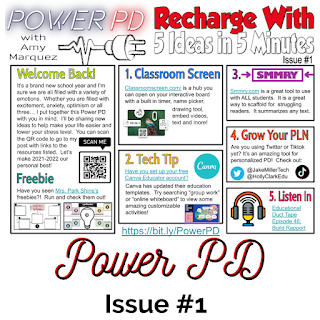
I'm so excited to finally be sharing my 2021-2022 Power PD newsletter.  I was inspired by many other educators who have been doing #PottyPD or #CopierPD and I wanted to try this out but put my own spin on the name.  Each issue with have a short message from me and 5 ideas teachers can use to "recharge" their teaching.  Ready to check it out?  Here we go! Welcome back to the 2021-2022 school year!  Thank you for taking the time to check out my Power PD newsletter and this blog.  The purpose of this blog is to share my educational journey with you!  On here you will find additional information about the items in the Power PD flyer you saw.   I will be posting all Power PD newsletters in one Google Slides deck.  You can see it below.  Please check back often for the latest newsletters. 1.  Classroom Screen - this is an awesome tool you can use to help you manage your classroom.  Check out Pocketful of Primary's video tutoria...

How Becoming a Google Trainer Forever Changed Me

Image
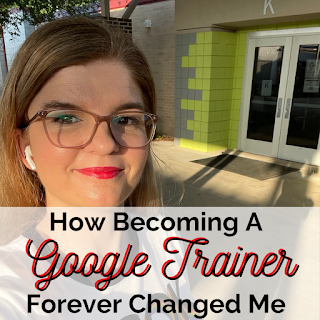
This post is week 8 of 8 in the #8WeeksofSummer Blog Challenge for educators . Honestly, as the final week concludes I'm sad to see it go. I'm so glad I stumbled across this challenge during #pd4uandme Twitter Chats.  I had received some feedback from a few of my colleagues and friends that I should try my hand at something new.  One suggested blogging and one suggested opening a TPT store.  I thought about options and marked them down as possibilities.  When I saw the #8weeksofsummer Blog Challenge I knew this was the time for me to make the leap and just start already!   This week's topic is all about sharing new knowledge, skills and attitudes I learned this year.  The biggest change that led me to gaining new knowledge was becoming a Google certified trainer.  It has opened so many doors for me.  Three years ago I attended a regional service center training to become Google level one certified.  During that summer, three years ago, t...

My Go-To Technology Integration Tools

Image
Hi friends!  As the return to school quickly approaches, I am preparing materials to share with my staff.  One of the items on my to do list is to put together a list of tools that would be the tools I'd recommend to any teacher to try out.  During the school year, I made a list of all the technology tools I am familiar with and I categorized them by how I would use them, for example- collaboration, video editing, creative response, screen casting, etc.  It started out as a Google Doc that you can check out here.  Since then it has evolved.  I knew I wanted to take this to the next level and make it more visually appealing.  So I did a thing... I made an ebook using Canva!  I put together some tips on lesson planning with technology integration and some tools I'd recommend based on the 4 C's.  I wanted to make sure it was not too overwhelming.  So you will find a few tools for each category.   Can I ask for your help?  Wil...

PD Book Round Up 3

Image
This post is week 7 of 8 in the #8WeeksofSummer Blog Challenge for educators .  I don't know about you, but I always have mixed emotions as we get ready to go back to school.  I am excited about all the potential each new school year brings, but I'm also feeling like summer passed to quickly.  Can you relate?  Throughout this summer I have been searching out my own training through my PLN on Twitter, PD books and other online resources.  I also stumbled upon some new to me blogs and podcasts that I felt like I could really relate to.  One thing all of these resources have in common is that they are focused on one or more of these topics:  how to engage students with high yield strategies a framework that allows students to represent their ideas in multiple ways and to provide students voice and choice in how they express what they know using backward design to choose technology tools after the learning objective has be set innovative teaching methods...