Posts

Showing posts with the label Google slides

Choice Boards in Action With High Schoolers

Image
Choice boards have been around for awhile, however I have noticed they are really trending lately.  When I was an elementary teacher and librarian, I did use choice boards in a low tech way.  I gave students options in how they might respond to a lesson. Now that our campus is one to one with devices, I realized I hadn't tried digital choice boards with my high school students.  I decided to go with combination of stations and choice boards to flip my instruction with my 11th graders last week.  I knew I wanted to structure their library visit in a way that we could cover four areas: finding a good book, researching colleges, exploring test prep materials and checking out a book.    So how do we start using choice board in way that works for teachers and students. Tip 1: Use a template I'm always so inspired by what Mrs. Howell is doing with Gold Edu and I decided to use a template she shared with our group.  Here is the template I used: Inspiration/ t...
Power PD- Recharge With 5 Ideas in 5 Minutes Issue 1

Image
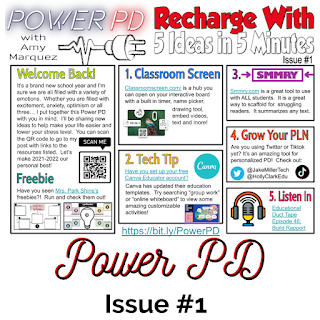
I'm so excited to finally be sharing my 2021-2022 Power PD newsletter.  I was inspired by many other educators who have been doing #PottyPD or #CopierPD and I wanted to try this out but put my own spin on the name.  Each issue with have a short message from me and 5 ideas teachers can use to "recharge" their teaching.  Ready to check it out?  Here we go! Welcome back to the 2021-2022 school year!  Thank you for taking the time to check out my Power PD newsletter and this blog.  The purpose of this blog is to share my educational journey with you!  On here you will find additional information about the items in the Power PD flyer you saw.   I will be posting all Power PD newsletters in one Google Slides deck.  You can see it below.  Please check back often for the latest newsletters. 1.  Classroom Screen - this is an awesome tool you can use to help you manage your classroom.  Check out Pocketful of Primary's video tutoria...

Thinking Outside the Box with Tech Tools

Image
This post is week 4 of 8 in the #8WeeksofSummer Blog Challenge for educators.   As we settled in to virtual learning for over a year in my district, my technology integration expertise definitely grew.  I felt like I was in a constant period of growth and learning.  Which tools did I discover this year and which familiar tools did I branch out and try in new ways?  Today's topic is a fun one, but also a little overwhelming to answer.  I feel like, where do I begin?  I'm sure you probably feel this way as well.  The 2020-2021 school year was the year of "all the technology tools." The Familiar I think the most frequent tools I used were the Google Workspace platform.  Getting Google Trainer certified was the best decision I made in the summer of 2020.  It truly propelled me to be equipped to train my staff and students on technology integration.  I was able to start visualizing any task and connect which Google tool would be the right fit...